Featured product
One product with its gallery, price, variant buttons, quantity and add to cart on any page. Works without JavaScript; every shopper-facing word is editable.
- Category
- Product and collection discovery
- Use on
- Home, Landing pages, Collection, Any page
- Reads
- One product
- Size
- 41 KB, small script included
- License
- MIT, free for client work
In short
Featured product is a free Shopify section that puts one product you choose on any page, with its image gallery, price and sale label, variant buttons, quantity and an add to cart button. The form posts to Shopify's cart, so it works even without JavaScript, and price, availability and image follow the chosen variant. It works in Online Store 2.0 themes without an app.
When to use it
- Hero product or best seller on the home page, buyable without leaving the page
- Launch or campaign landing page built around a single product
- Gift guide, blog or About page that sells the product it talks about
In the theme editor
- Product picker; vendor, description and quantity selector on or off
- Product title tag (H1–H3 or paragraph) and size
- Gallery from the product's images with thumbnails; shape (adapt, square, portrait, landscape) and corner radius
- Variant buttons per option, add to cart through Shopify's product form
- Details link to the product page: solid, outline or text link, optional new tab
- Editable shopper-facing words: Add to cart, Sold out, Unavailable, Sale and screen-reader labels
- Gallery left or right at half or wide width, order on mobile, page or full width, text alignment per device
- Background, text, button and sale color, border color
- Top and bottom padding per device, show on desktop/mobile only, anchor ID, fade in on scroll
Files
sections/lib-featured-product.liquidView the code
snippets/lib-button.liquidView the code
Written in plain Liquid and CSS with a small script. No app, no dependencies.
How to add it to your theme
- Copy the section file into your theme’s sections folder, and any snippet it lists into snippets.
- In the theme editor, choose Add section and pick the one that starts with “Lib ·”.
- Replace the sample text with your store’s own, and set the colors to match your brand.
Questions
- Can shoppers add to cart without opening the product page?
- Yes. The section contains a real product form that posts the chosen variant and quantity to /cart/add, so the item lands in the cart and Shopify takes the shopper to the cart as usual. A "View full details" link to the product page is optional.
- How are sold-out variants shown?
- Sold-out options stay visible and can still be picked: they are struck through and screen readers hear "sold out" after the value. When the chosen variant is sold out the button reads "Sold out", is disabled, and a sold-out label shows next to the price. Combinations that do not exist show "Unavailable".
- Does it work without JavaScript?
- Yes. Without JavaScript the options are one menu of every variant with its price, and sold-out variants are disabled. With JavaScript the menu becomes option buttons, and the price, compare-at price, sale label, availability and main image update for the chosen variant; the page URL is left alone.
- Does it show reviews or stock levels?
- No. It only shows what the product itself has: images, title, vendor, price, compare-at price, variants, availability and description. Nothing is invented, such as ratings, low-stock counts or viewer numbers.
- Can I translate the button and labels?
- Every word a shopper sees or hears is a setting: Add to cart, Sold out, Unavailable, Sale, the sale and regular price labels, the quantity buttons and the thumbnail buttons. Change them in the theme editor or translate them with Translate & Adapt.
Before you publish
- The text in the demos is sample content. Replace it with facts about your own store before you publish.
- Animations are switched off for visitors who ask for reduced motion.
- We check every file with Shopify Theme Check before publishing it here.
Need it adapted to your theme, or a section that isn’t here? See Shopify theme development.
More sections
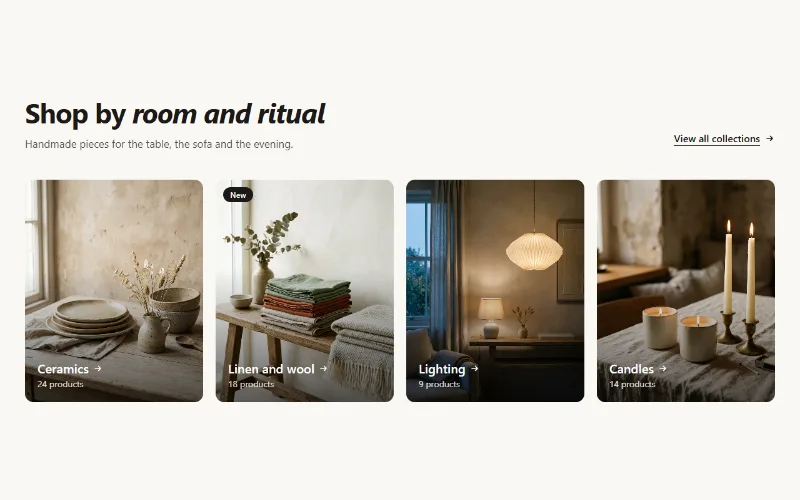
Product and collection discovery
Collection cards
Up to eight collection cards with image, title, label and product count. Text over the image or below it, 2 to 5 columns, or a swipeable row on mobile.
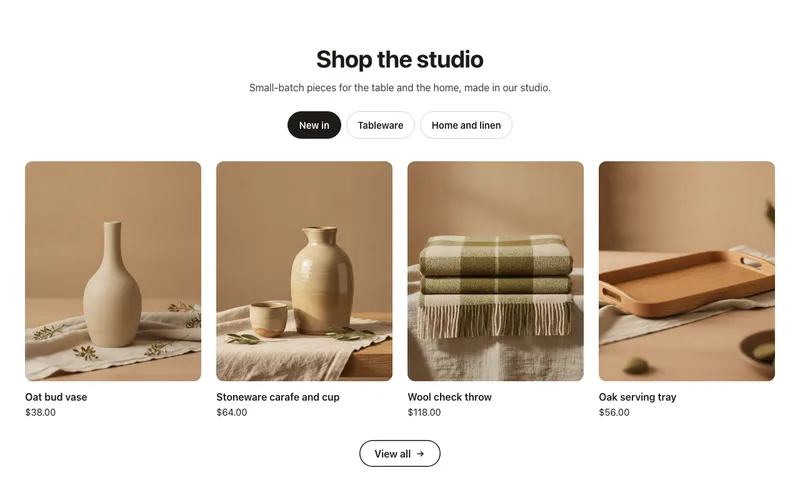
Product and collection discovery
Collection tabs
A product grid with tabs: New in, Best sellers, Sale or any collections in one section, each with a View all link. Accessible tabs, works without JavaScript.
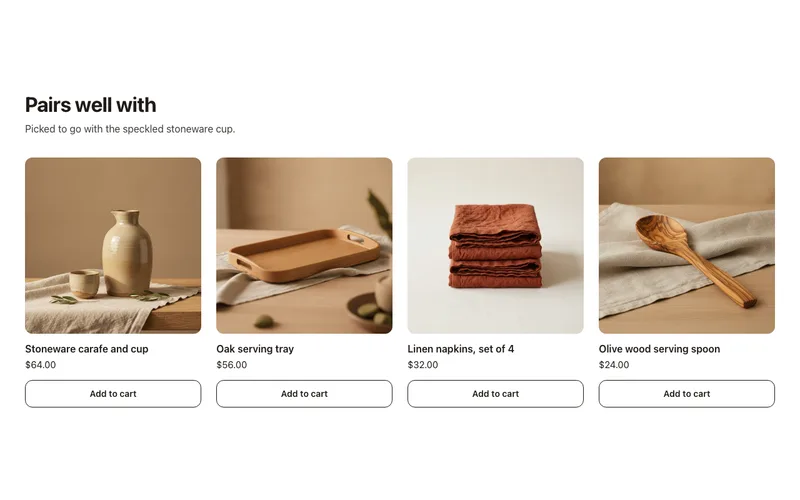
Product and collection discovery
Complementary products
"Pairs well with" cards on product pages from Shopify's complementary product recommendations, set in Search & Discovery, with quick add. No app fees.
